Home Server Hardware
May 31, 2025
Revised Feb 15, 2026
Documentation for my home server setup as it’s evolved over the years. Each tab represents a configuration at one point in time, from oldest (left) to newest (right).
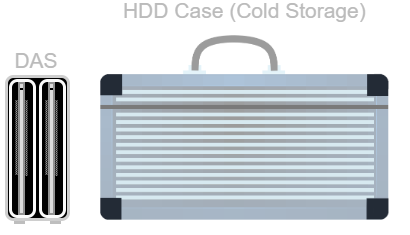
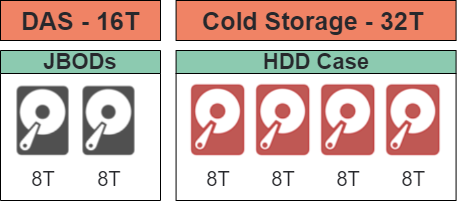
2013 - 2020
Direct-attached storage (DAS)
and cold storage
Physical(left) and logical(right). Drives lost to redundancy are
displayed in red.
Not quite a server, but it was my first foray into this sort of thing. I got this setup to expand the storage on my old laptop (which I had replaced with a larger drive prior), as well as back up family media scattered across various devices(VHS, DVD, Video8, etc.). The dual bay design seemed perfect at the time, as it allowed me to mirror my drives for some redundancy. Eventually I ended up with a few more drives, and needed a way to access more at a time.
Hardware |
|
|---|---|
Chassis |
DAS (ICY DOCK MB662U3-2S) |
Storage |
6x HDD |
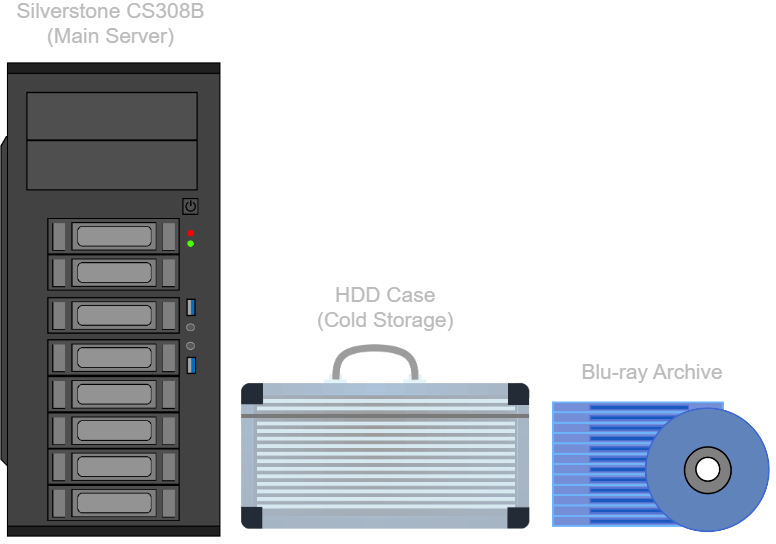
2020 - 2023
Ubuntu server, cold storage, and Blu-ray
archive
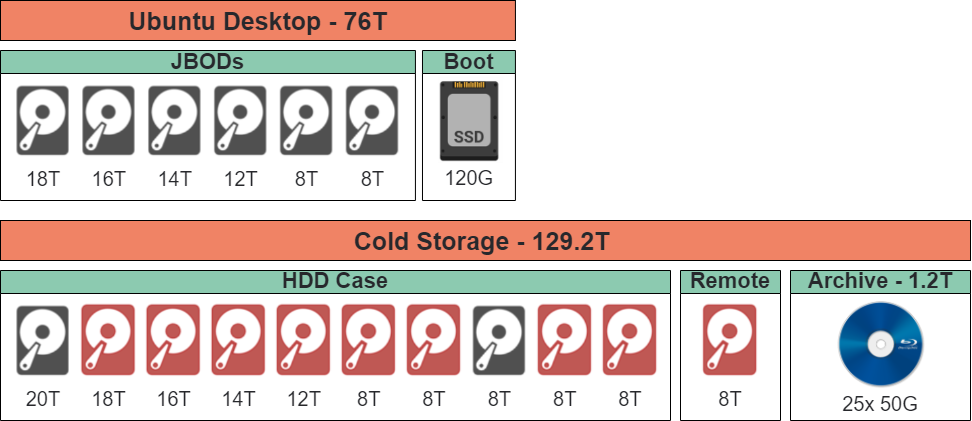
Physical(left) and logical(right). Drives lost to redundancy are
displayed in red.
Now it’s a network-attached storage (NAS) system. It used a series of drives (mirrored for backups, essentially a manual RAID 1), each available as a separate network share. The remote HDD and Blu-ray discs (cheaper than M-Disc, and probably good enough) contained anything important.
Main Server
This server (and also my first PC build) was designed to serve files from the main drives, support ingesting data from HDDs, and burn discs for optical backups. The hardware I used did the job, though the use of USB splitters, and USB-to-SATA adapters was not ideal. I would have used the other USB header, but I assumed it was broken. Years later I reread the manual and discovered that using the USB3 header disables the second USB2 header. You live and you learn.
Software / Hardware |
Notes |
|
|---|---|---|
OS |
Ubuntu Desktop |
A more friendly option for us Windows folks |
Chassis |
Silverstone CS380B |
Eight hot-swap HDD bays and two 5.25“ bays |
Motherboard |
ASRock J3455B-ITX |
A good enough CPU/motherboard combo |
PCIe 2.0 x16 (x2) |
8-Port HBA (LSI SAS9211-8I) |
Eight more SATA ports |
USB 2.0 Header |
2x USB splitters to 4x USB-to-SATA adapters |
Four more SATA ports |
CPU |
Intel Celeron J3455 |
|
GPU |
Integrated Intel HD Graphics 500 |
|
RAM |
2x 8GB DDR3L 1600MT/s (Silicon Power SP008GLSTU160N02) |
The maximum memory supported |
Networking |
GbE (Realtek RTL8111GR) |
|
Storage |
• OS: SSD (Kingston SA400S37) |
|
Optical |
• 12.7mm ODD (Lite-On DS-8ACSH) |
M-Disc and Blu-ray |
PSU |
750W (EVGA 110-BQ-0750-V1) |
Enough to power everything |
Fans |
• Exhaust: 120mm (Noctua NF-S12A) |
F12 for static pressure and S12A for airflow |
UPS |
750VA (APC ES-750) |
Protection from occasional power outages |
Cold Storage
These drives were all stored in a foam hard-case (except for the remote drive). The Blu-rays went unused as my data wasn’t organized well enough yet.
Hardware |
|
|---|---|
Storage |
• Backup: 11x HDD |
Peripherals
The below peripherals were used for direct access to the servers if necessary (such as a network failure or boot issue).
Type |
Model |
Notes |
|---|---|---|
Monitor |
19.5“ HD+@60Hz (HP P204) |
The cheapest I could find, since it’s just a terminal |
Keyboard / Trackpad |
Vilros VILP261 |
A wired keyboard and trackpad combo for basic input |
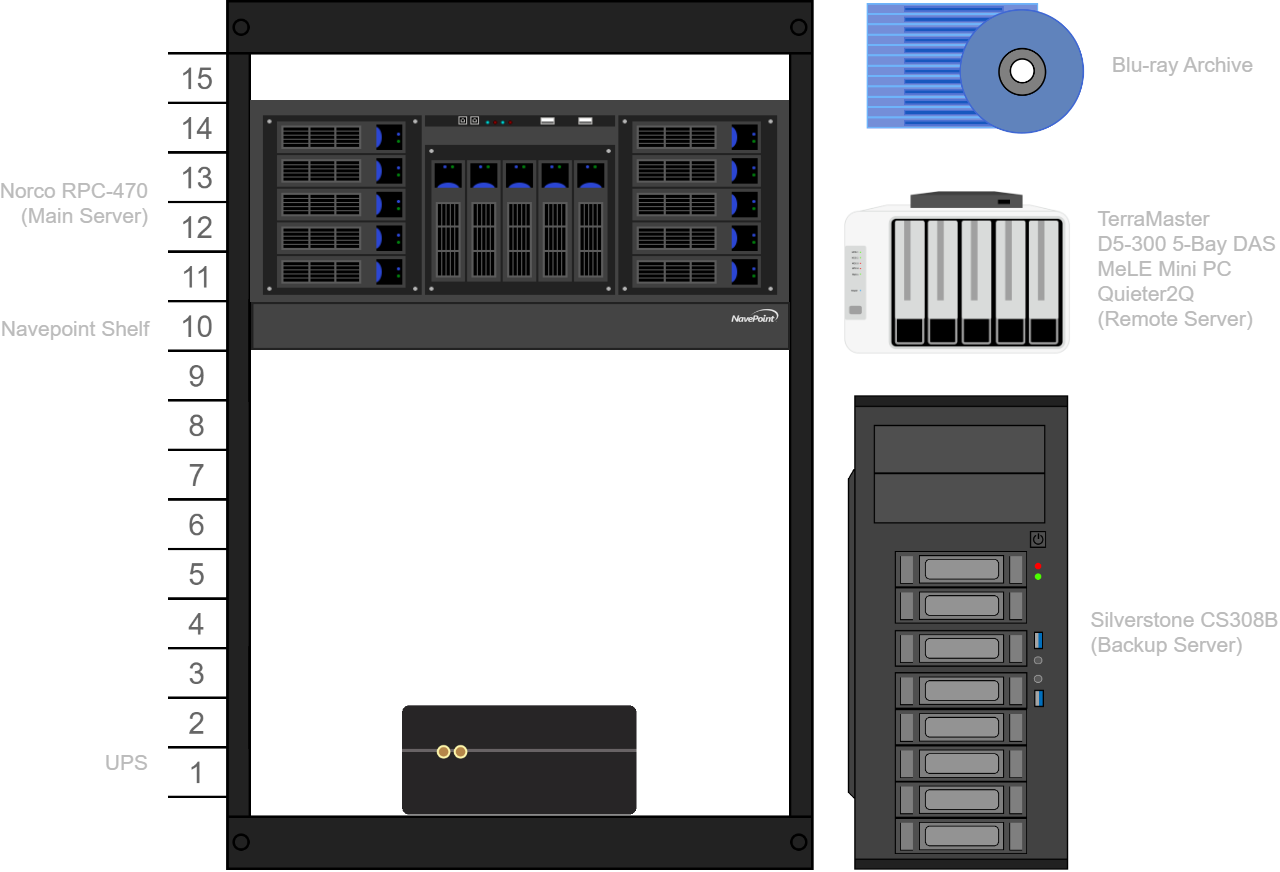
2023 - 2024
TrueNAS server, backup server, remote
server, and Blu-ray archive
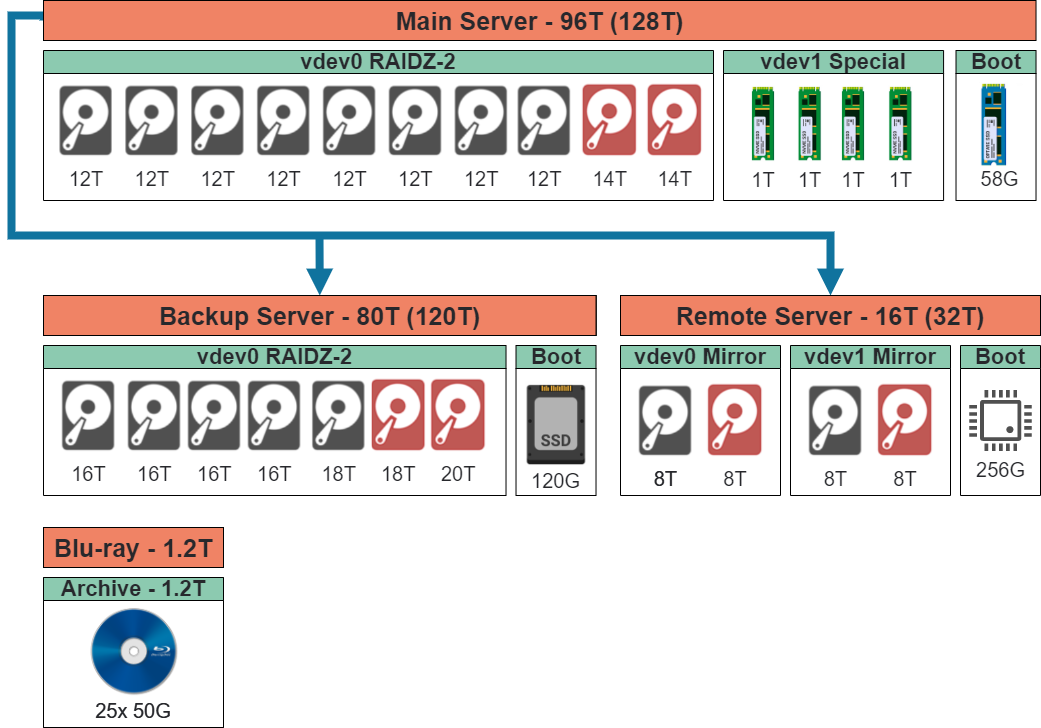
Physical(left) and logical(right). Drives lost to redundancy are
displayed in red.
Manual backups were a hassle, as it required inserting drives one by one, syncing them, and checking for corruption. Having separate drives (JBODs) was also an issue, as I had to shuffle data between them when they became full. Thus I made the move to ZFS with TrueNAS Scale (TrueNAS Core seems less supported and I’m not as familiar with FreeBSD) which, along with automated backups, solves all my problems. If you want to learn more about ZFS, I recommend “OpenZFS: the final word in file systems” by Jason Rose.
Main Server
I went with a rack mounted system to avoid having multiple towers. Using the drives I had, I set up a RAIDZ2 pool for data (larger drives take longer to resilver and thus increase the risk of failure). A special vdev was added with similar redundancy (3-way mirror) for faster metadata access. PCIe bifurcation is poor on this motherboard, the only option was 2x4 (actually x4x4x8). The NVMe in the x8 lanes kept dropping, so the special was expanded to a 4-way mirror. AMD states that while the 5700G CPU has the same lanes as non-APU variants, they do not support x4x4x4x4.
Software / Hardware |
Notes |
|
|---|---|---|
OS |
TrueNAS Scale |
Simple ZFS management |
Chassis |
Norco RPC-470 |
Nine 5.25“ bays with no proprietary backplane |
Motherboard |
ASRock X570 Steel Legend |
Lots of PCIe lanes and eight built in SATA ports |
PCIe 3.0 x16 (x16) |
4-Port NVMe to PCIe Card (10Gtek S95N416-0) |
Similar redundancy to the data vdev |
PCIe 3.0 x16 (x4) |
8-Port HBA (LSI SAS9211-8I) |
|
CPU |
AMD Ryzen 5 5700G |
|
GPU |
Integrated AMD Radeon Vega Series Graphics |
Frees the x16 slot for the HBA |
RAM |
2x 32GB DDR4 3600MT/s (Patriot PVE2464G360C0K) |
Maximizing RAM for ZFS |
Networking |
GbE (Intel I211AT) |
|
Storage |
• OS: PCIe 3.0 NVMe (Intel P1600X) |
Optane for endurance |
PSU |
850W (EVGA 210-GQ-0850-V1) |
Seems to be enough |
Fans |
• Exhaust: 2x 80mm (Stock) |
Uses the stock fans |
UPS |
750VA (APC ES-750) |
Protection from occasional power outages |
Rack |
15U variable depth (Raising Electronics FBM-CR6N15-9001) |
Needs a 1U shelf to support the server ☹️ |
Backup Server
The previous Silverstone server. I like the idea of a backup server over cold storage, as it allows for live error detection/correction, as well as automated backups. The OS was changed to TrueNAS, that way I could use ZFS to pull snapshots from the main server to this server. The idea is that it’s faster (because it’s incremental), and better for security, as the main server (which is more likely to be breached or infected) can’t access the backup. Ubuntu can use ZFS filesystems too, but TrueNAS is nicer for managing them.
Software / Hardware |
Notes |
|
|---|---|---|
OS |
TrueNAS Scale |
Takes advantage of ZFS snapshots |
Chassis |
Silverstone CS380B |
Eight hot-swap HDD bays and two 5.25“ bays |
Motherboard |
ASRock J3455B-ITX |
A good enough CPU/motherboard combo |
PCIe 2.0 x16 (x2) |
8-Port HBA (LSI SAS9211-8I) |
Eight more SATA ports |
USB 2.0 Header |
2x USB splitters to 4x USB-to-SATA adapters |
Four more SATA ports |
CPU |
Intel Celeron J3455 |
|
GPU |
Integrated Intel HD Graphics 500 |
|
RAM |
2x 8GB DDR3L 1600MT/s (Silicon Power SP008GLSTU160N02) |
The maximum memory supported |
Networking |
GbE (Realtek RTL8111GR) |
|
Storage |
• OS: SSD (Kingston SA400S37) |
|
Optical |
• 12.7mm ODD (Lite-On DS-8ACSH) |
M-Disc and Blu-ray |
PSU |
750W (EVGA 110-BQ-0750-V1) |
Enough to power everything |
Fans |
• Exhaust: 120mm (Noctua NF-S12A) |
F12 for static pressure and S12A for airflow |
UPS |
750VA (APC ES-750) |
Protection from occasional power outages |
Remote Server
Similar to the reasons above, I wanted the remote backup to be handled automatically, rather than me manually syncing a drive or two, so it’s also a server now. It’s smaller than the main server, so only a subset of my data can be backed up here.
Software / Hardware |
Notes |
|
|---|---|---|
OS |
TrueNAS Scale |
ZFS snapshots (important for slow connections) |
Chassis |
• DAS (TerraMaster D5-300) |
Made use of what I had |
Motherboard |
ASRock J3455B-ITX |
|
CPU |
Intel Celeron J4125 |
|
RAM |
8GB |
|
Networking |
GbE |
|
Storage |
• OS: Internal Flash |
Mirrored instead of RAIDZ2 due to SMR resilvers |
Cold Storage
Unused Blu-ray cold storage. I need to figure out what data is critical. My organization’s not terrible, but it does need some work.
Hardware |
|
|---|---|
Storage |
25x Blu-ray |
Peripherals
A KVM was added to easily share the monitor and keyboard.
Type |
Model |
Notes |
|---|---|---|
Monitor |
19.5“ HD+@60Hz (HP P204) |
The cheapest I could find, since it’s just a terminal |
Keyboard / Trackpad |
Vilros VILP261 |
A wired keyboard and trackpad combo for basic input |
KVM |
Single-Monitor (UGREEN 15707A) |
Can switch servers with the push of a button |
2024 - Present
TrueNAS server, backup server, remote
server, flash server, and Blu-ray archive
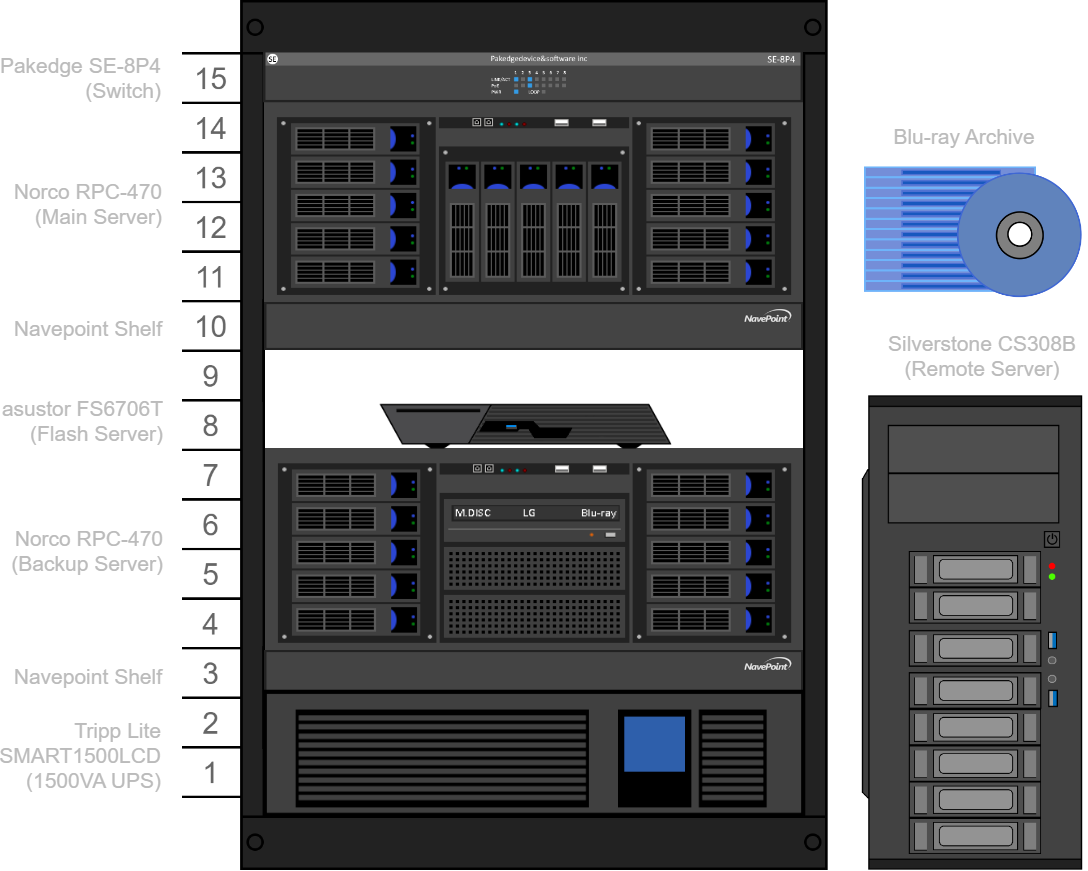
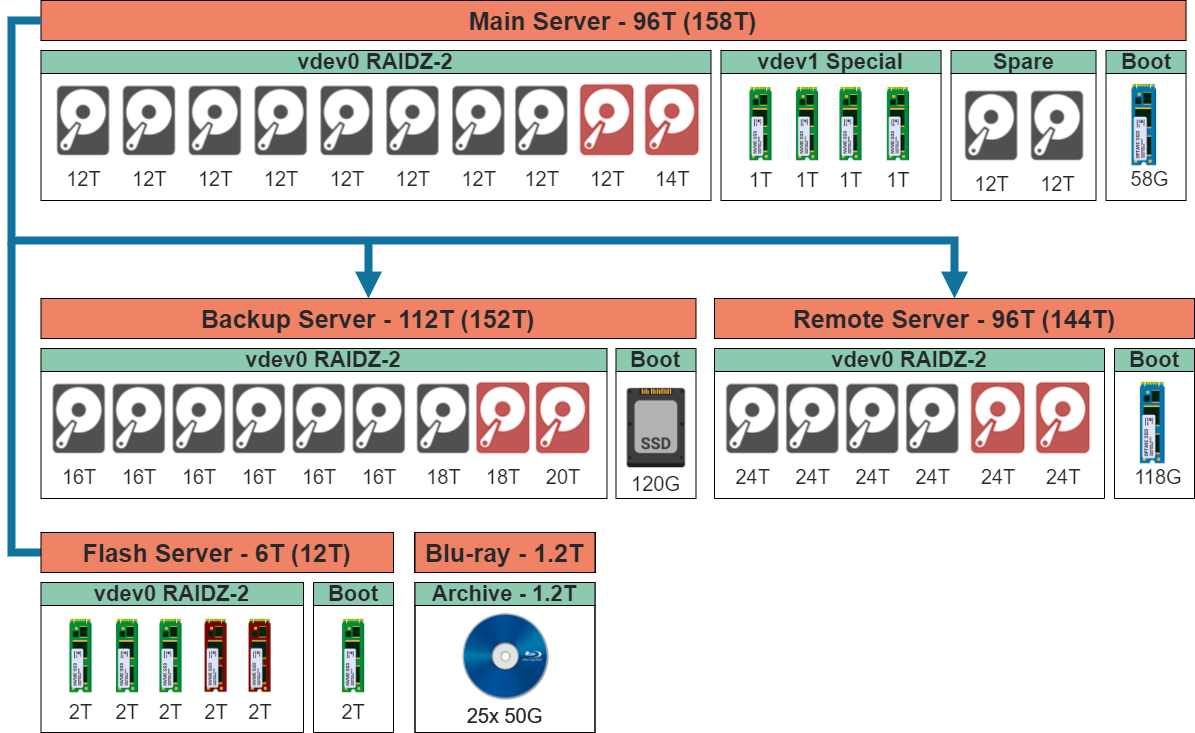
Physical(left) and logical(right). Drives lost to redundancy are
displayed in red.
Two servers (main/flash) are used for file access and other services. The other two (backup/remote) work in the background, automatically backing them up. The remote server is located in a different state for added data protection. The other servers are rack mounted, with everything connected to the switch and UPS. That way they can still communicate in the event of a power outage.
Main Server
Provides files storage and other services.
A special vdev was added with similar redundancy (3-way mirror) to the main pool for faster metadata access. This was later expanded to a 4-way mirror due to the motherboards poor PCIe bifurcation support causing one of the drives to occasionally disconnect.
Software / Hardware |
Notes |
|
|---|---|---|
OS |
TrueNAS Scale |
Simple ZFS management |
Chassis |
Norco RPC-470 |
Nine 5.25“ bays with no proprietary backplane |
Motherboard |
ASRock X570 Steel Legend |
Lots of PCIe lanes and eight built in SATA ports |
PCIe 3.0 x16 (x16) |
4-Port NVMe to PCIe Card (10Gtek S95N416-0) |
Similar redundancy to the data vdev |
PCIe 3.0 x16 (x4) |
8-Port HBA (LSI SAS9211-8I) |
|
CPU |
AMD Ryzen 5 5700G |
|
GPU |
Integrated AMD Radeon Vega Series Graphics |
Frees the x16 slot for the HBA |
RAM |
2x 32GB DDR4 3600MT/s (Patriot PVE2464G360C0K) |
Maximizing RAM for ZFS |
Networking |
GbE (Intel I211AT) |
|
Storage |
• OS: PCIe 3.0 NVMe (Intel P1600X) |
Optane for endurance |
PSU |
850W (EVGA 210-GQ-0850-V1) |
Seems to be enough |
Fans |
• Exhaust: 2x 80mm (Stock) |
Uses the stock fans |
UPS |
1500VA (Tripp Lite SMART1500LCD) |
Protection from occasional power outages |
Rack |
15U variable depth (Raising Electronics FBM-CR6N15-9001) |
Needs a 1U shelf to support the server ☹️ |
Backup Server
I like the idea of a backup server over cold storage, as it allows for live error detection/correction and automated backups. ZFS is used to pull snapshots from the main server, which is faster (because it’s incremental), and better for security (main server can’t access backup server) compared to traditional methods. The storage capacity is expanded beyond the main server for extra snapshots.
It was moved from the old Silverstone chassis to a new rack mounted Norco RPC-470 chassis. The UPS (now rack mounted) connects via USB, and is monitored using a Network UPS Tools (NUT) service. A switch (powered via the UPS) was needed to allow the main server to also monitor the UPS.
Software / Hardware |
Notes |
|
|---|---|---|
OS |
TrueNAS Scale |
Takes advantage of ZFS snapshots |
Chassis |
Norco RPC-470 |
Nine 5.25“ bays with no proprietary backplane |
Motherboard |
ASRock J3455B-ITX |
A good enough CPU/motherboard combo |
PCIe 2.0 x16 (x2) |
8-Port HBA (LSI SAS9211-8I) |
Eight more SATA ports |
USB 2.0 Header |
2x USB splitters to 4x USB-to-SATA adapters |
Four more SATA ports |
CPU |
Intel Celeron J3455 |
|
GPU |
Integrated Intel HD Graphics 500 |
|
RAM |
2x 8GB DDR3L 1600MT/s (Silicon Power SP008GLSTU160N02) |
The maximum memory supported |
Networking |
GbE (Realtek RTL8111GR) |
|
Storage |
• OS: SSD (Kingston SA400S37) |
Supports twelve HDDs |
Optical |
• 12.7mm ODD (Lite-On DS-8ACSH) |
M-Disc and Blu-ray |
PSU |
750W (EVGA 110-BQ-0750-V1) |
Enough to power everything |
Fans |
• Exhaust: 2x 80mm (Noctua NF-A8) |
A8/12 for low noise |
UPS |
1500VA (Tripp Lite SMART1500LCD) |
Protection from occasional power outages |
Rack |
15U variable depth (Raising Electronics FBM-CR6N15-9001) |
Needs a 1U shelf to support the server ☹️ |
Remote Server
This serves the same function as the backup server, but resides in a different state, protecting my data from larger disasters. I wanted to minimize the amount of drives (a regret I have using 12TB HDDs), so I went with the largest reasonably priced drives available.
It’s built in the chassis of the old backup server, which itself was moved into the rack. This allows for more drives.
Software / Hardware |
Notes |
|
|---|---|---|
OS |
TrueNAS Scale |
ZFS snapshots (important for slow connections) |
Chassis |
Silverstone CS380B |
Eight hot-swap HDD bays and two 5.25“ bays |
Motherboard |
MSI B450M-A PRO MAX II |
PCIe x16 slot, 4x SATA ports |
PCIe 3.0 x16 (x16) |
8-Port HBA (LSI SAS9211-8I) |
|
CPU |
AMD Ryzen 5 5600G |
Overkill, but I may repurpose this for desktop use |
GPU |
Integrated AMD Radeon Vega Series Graphics |
|
RAM |
2x 32GB DDR4 3600MT/s (Patriot PVE2464G360C0K) |
The maximum memory supported |
Networking |
2.5GbE (Realtek 8125) |
My LAN is GbE, but the option is nice |
Storage |
• OS: PCIe 3.0 NVMe (Intel P1600X) |
|
PSU |
750W (Corsair RM750e) |
Apparently the best for 750W PSUs |
Fans |
• Exhaust: 120mm (Noctua NF-S12A) |
F12 for static pressure and S12A for airflow |
Flash Server
A flash server to allow for fast, reasonably sized storage in a compact space. I went with the asustor FS6706T for its six NVMe bays in a small form factor, allowing it to provide high speed access while hiding away in a closet. If I had to do it again, I’d have chosen the twelve bay model and used 4TB drives. With two drives lost to redundancy and one lost to the OS, only half the bays are usable.
Software / Hardware |
|
|---|---|
OS |
TrueNAS Scale |
Chassis |
asustor FS6706T |
CPU |
Intel Celeron N5105 |
RAM |
2x 8GB DDR4 3200MT/s (Crucial CT2K16G4SFRA32A) |
Networking |
Dual 2.5GbE |
Storage |
6x PCIe 4.0 NVMe |
Cold Storage
The only data on my servers that matters to others are the family photos, but if I were gone or otherwise unavailable no one would know how to access them. The Blu-rays serve as an immutable, easy to access storage.
Software / Hardware |
|
|---|---|
Storage |
25x Blu-ray |
Filesystem |
UDF |
Parity |
PAR2 |
Peripherals
These are used for direct access to the servers if necessary (such as a network failure or boot issue).
Type |
Model |
Notes |
|---|---|---|
Monitor |
19.5“ HD+@60Hz (HP P204) |
The cheapest I could find, since it’s just a terminal. |
Keyboard / Trackpad |
Vilros VILP261 |
A wired keyboard and trackpad combo for basic input. |
KVM |
Single-Monitor (UGREEN 15707A) |
Can switch servers with the push of a button. |